Directing AI models: pose, gaze and backdrop
Generation takes seconds; direction is the craft. How to use pose, gaze and backdrop to make an AI on-model image look like your brand shot it.
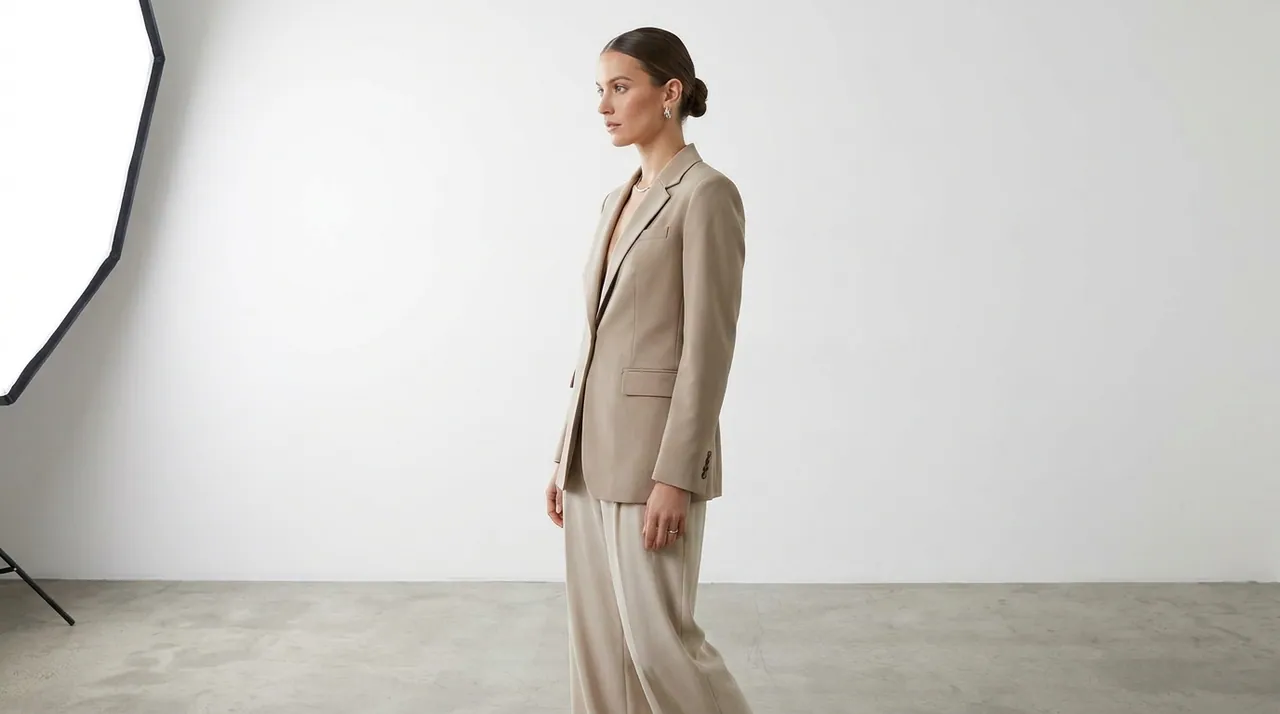
Generating an on-model image is the easy part — it takes under 15 seconds. Making it look like your brand shot it is the craft. The difference between a generic result and a campaign-ready one is direction: the same decisions a good photographer and stylist make on set, made deliberately instead of by accident.
Three levers do most of the work — pose, gaze and backdrop. Here's how to use them.
Pose: let the product lead
Pose isn't decoration; it's how the product does its job. Direct it by category and by what the customer needs to see.
- Apparel — pose for drape and movement. A slight three-quarter turn shows how fabric falls; a subtle contrapposto reads more natural than a stiff front-on. For outerwear, a hint of walk shows weight and length.
- Footwear — the angle is the message. A raised step or a crossed ankle shows the profile and the sole; straight-down flatters nothing.
- Watches & jewelry — the pose is a frame for a small object. A bent wrist, a hand near the face, fingers relaxed — the body should point to the piece without competing with it.
- Bags — carried, not held out. On the shoulder, in the crook of the arm, in hand mid-stride — show scale and how it's actually worn.
The rule beneath all of them: decide what the shopper is unsure about, and pose to answer it.
Gaze: set the relationship
Where the model looks decides how the image feels — and it's the lever teams most often leave to chance.
- To-camera is direct and commercial. It builds trust and works hard on a PDP, where the shopper is making a decision.
- Away from camera is editorial and aspirational. It suggests a world around the product and suits campaigns, lookbooks and top-of-funnel social.
- Down or to the side feels candid and soft — useful when the product, not the person, should hold attention.
A simple pattern: to-camera for the store, away for the story. Match gaze to where the image will live.
Backdrop: decide clean or world
The backdrop sets context and, more than anything, sets consistency.
- Seamless studio — a clean, single-tone wall. This is the workhorse for e-commerce: no distraction, fast to scan, endlessly consistent across a catalog.
- Environmental — a real or implied place. It builds mood and aspiration for campaigns, but it should never fight the product for attention.
Whichever you pick, choose the light with it. Soft, even light for honest e-com color; directional light for editorial drama. Keeping the light consistent within a category is what makes a page of images feel shot by one team on one day.
Generation gives you options. Direction gives you a brand.
The lever most people miss: consistency
Any single image is easy. A collection that looks like one shoot is the real test — and it comes from repetition, not luck.
- Fix your defaults. Settle on a house pose language, a default gaze and a signature backdrop, then reuse them. Consistency is a decision you make once.
- Cast, don't clone. Vary the models across a collection so it feels like a real cast, while keeping pose, light and backdrop steady. Same world, different faces.
- Match light across SKUs. Two products shot under different light will never sit next to each other cleanly — keep it constant so the grid reads as one story.
This is where a brand kit earns its keep: lock the recipe once and every future image inherits it, whether you generate ten or ten thousand.
A starting recipe
If you want a default that just works, start here and adjust:
- PDP hero: three-quarter pose, to-camera gaze, seamless studio backdrop, soft even light.
- Campaign: dynamic pose, gaze away, environmental backdrop, directional light.
- Social: relaxed pose, candid gaze, a simple backdrop with a hint of place.
Generate, compare, keep the two that sell, and save the settings as your house style. The model, the pose, the gaze, the light — you control all of it. Direction is simply choosing on purpose. Do that, and "AI-generated" stops being a look and starts being an invisible part of how your brand is made.
More field notes
Turn your next flat shot into on-model imagery.
Start free — 10 images, no card. See what a shoot-free catalog actually looks like.